
Real-Time Page Analytics for Website Optimization
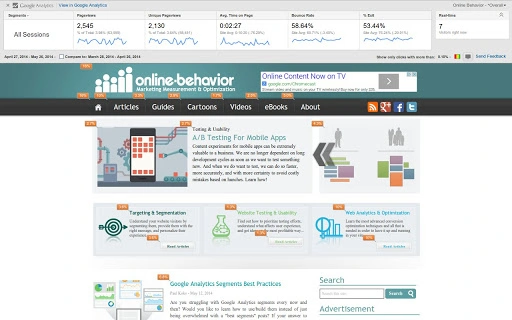
С помощью расширения Page Analytics для Chrome пользователи получают прямой доступ к критически важным данным о взаимодействии с сайтом во время просмотра своих страниц. Этот инструмент предназначен для владельцев сайтов, цифровых маркетологов и специалистов по UX, которым нужны аналитические данные в реальном времени для улучшения макетов, повышения удобства использования и увеличения коэффициента конверсии. Интегрируясь с Google Analytics, расширение отображает ключевые метрики, такие как просмотры страниц, показатель отказов, среднее время на странице и уникальные просмотры, непосредственно в браузере. Расширение также визуализирует клики по странице, выделяя зоны с наибольшей и наименьшей активностью пользователей. Это помогает выявлять слабо работающие разделы и оптимизировать пути навигации. Инструмент особенно полезен для A/B‑тестирования, оценки размещения контента и повышения эффективности призывов к действию. Он поддерживает подсчёт посетителей в реальном времени и позволяет пользователям применять сравнение дат и сегментацию прямо в расширении. Идеально подходит для команд, управляющих несколькими сайтами, или тех, кто нуждается в быстром доступе к данным о производительности без выхода из браузера. Расширение работает только на страницах, где у пользователя есть доступ к Google Analytics, обеспечивая конфиденциальность и безопасность данных. Его лёгкий дизайн гарантирует минимальное влияние на производительность браузера.
Key Features & Capabilities
- Real-Time Page Metrics – Displays core Google Analytics data including pageviews, unique pageviews, average time on page, bounce rate, and exit rate directly on the webpage. This enables instant assessment of content performance.
- In-Page Click Tracking – Visualizes user clicks through interactive bubbles, showing high-traffic areas and underutilized sections. Helps identify effective and ineffective design elements.
- Real-Time Visitor Count – Shows the number of active visitors on a page at any given moment, useful for monitoring traffic spikes during campaigns or events.
- Integrated Date Comparison & Segmentation – Allows users to compare performance across different time periods and apply segmentation directly within the extension, reducing the need to switch between tools.
- Custom Date Ranges & Enhanced Link Attribution – Supports custom date ranges for deeper analysis and improved tracking accuracy through Enhanced Link Attribution support.
- Lightweight & Efficient – At just 1.2 MB, the extension loads quickly and operates without slowing down the browser, even on complex pages.
These features enable professionals to make data-driven decisions without leaving their browser. For example, a marketer can instantly see which section of a landing page receives the most clicks and adjust content placement accordingly. A UX designer can evaluate whether users are engaging with key buttons or skipping critical information. The ability to view data in context—on the actual page—reduces cognitive load and accelerates optimization cycles.
User Interface, Workflow & Performance
The extension’s interface is minimal and context-aware, appearing as a compact overlay on the web page when activated. Navigation is intuitive: clicking the extension icon toggles the report visibility, allowing users to view or hide analytics data with a single action. The layout organizes key metrics and click heatmaps in a clean, non-intrusive format. Users can interact with the data directly—filtering by date range or segmenting by user type—without switching to the Google Analytics dashboard. The workflow is streamlined, supporting rapid decision-making during design reviews or campaign analysis. Performance is optimized for speed and stability. The developer did not specify resource usage details, but the extension’s small size and focused functionality suggest low CPU and RAM consumption. It does not interfere with page rendering or browser responsiveness. The extension reliably loads data, especially after recent fixes addressing data loading issues and hit ID validation. Stability appears consistent across multiple page types and analytics configurations.
Compatibility & System Requirements
The Page Analytics Chrome Extension is compatible with Windows and Mac operating systems. It runs on Chrome browsers with the latest updates, ensuring broad accessibility across modern devices. The installation size is 1.2 MB, which is minimal and suitable for systems with limited storage. The developer did not provide additional system requirements. Exact performance details were not specified. Platform compatibility information is limited to the supported operating systems. No hardware-specific demands were mentioned. The extension functions only on web pages where the user has access to the associated Google Analytics account, ensuring secure and authorized data access.
Pros and Cons
Pros
- Real-time insights directly on the webpage
- Visual click tracking with interactive bubbles
- Lightweight design at only 1.2 MB
- Seamless integration with Google Analytics
- Supports custom date ranges and segmentation
- Free to use with no hidden costs
Cons
- Requires Google Analytics access to function
- Only available for Chrome browsers
- Does not work on pages without GA tracking code
- Limited to web-based analysis; no mobile app support
- Relies on external data sources (Google Analytics)
FAQ Section
Is the Page Analytics Chrome Extension free to use?
Yes, the extension is available at no cost. There are no subscription fees or premium tiers.
Which browsers does the extension support?
The extension is designed for Chrome browsers on Windows and Mac operating systems.
Do I need a Google Analytics account to use this tool?
Yes, the extension requires access to a Google Analytics account that is linked to the website being analyzed.
Can I use the extension offline?
No, the extension requires an active internet connection to fetch real-time data from Google Analytics.
How often is the data updated?
Data is updated in real time, reflecting current user interactions as they occur on the website.
Final Thoughts + CTA
The Page Analytics Chrome Extension delivers powerful, actionable insights directly within the browser, making it a valuable asset for digital professionals focused on website performance. Its real-time metrics, visual click tracking, and seamless integration with Google Analytics streamline the optimization process. While it is limited to Chrome and requires GA access, its lightweight design and free access make it highly accessible. Teams managing multiple sites or running conversion-focused campaigns will benefit most from its contextual data display and rapid workflow. The extension’s consistent updates and reliability further reinforce its utility. For anyone seeking to understand user behavior and improve website effectiveness, this tool provides immediate value. Download Page Analytics now to gain deeper insights into how visitors interact with your web pages.







